Code
    D  E  A  T  H
    B  C  F  G  I
    K  L  M  N  O
    P  Q  R  S  U
    V  W  X  Y  Z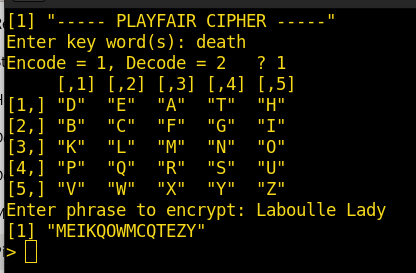
In the first part of this 2-part post, we started the process of describing my efforts in creating a “R” program for manipulating Playfair Ciphers. We were using the movie “National Treasure 2” code groups to explain the steps I took to proceed to a working script. We repeat the matrix used to encode and decode the letters here:
D E A T H
B C F G I
K L M N O
P Q R S U
V W X Y ZThe first function mentioned in the first post contain the steps to accept the key and create the matrix. CAVEAT: none of these functions or code snippets are anywhere near being efficient, well-formed, or best practice. This is just the steps I took to get the script working. So, here is the matrix setup function:
function() { # function to accept key and generate matrix ('J' removed).
    key <- readline(prompt="Enter key word(s): ")
    key <- gsub(" ", "", key, fixed = TRUE) # remove any spaces
    key <- toupper(gsub("J","I",key,fixed=T)) # replace 'J' with 'I', make all caps
    stKey <- str_length(key) # find number of characters in key
    key1 <- "" # pre-define vector for while statement
    x <- 1
    while ( x <= stKey ) { key1[x] <- str_sub(key,x,x); x=x+1 } # assign each letter to separate element
    rm(key) # finished with key, remove it
    Letters <- c("A","B","C","D","E","F","G","H","I","K","L","M","N","O","P","Q","R","S","T","U","V","W","X","Y","Z")
    mash <- c(key1,Letters) # merge both vectors (LETTERS is built-in dataset, but we remove letter 'J')
    fill <- unique(mash) # remove duplicate letters
    cip <- matrix(fill, nrow=5,ncol=5,byrow=T) # return cip
}
The last line above returns the ‘cip’ matrix, so doesn’t require a specific ‘return(cip)’ statement. There are two basic paths to the script, one for encryption, and one for decryption. I leave that as an exercise for the reader, as it is not complicated. In either branch, I first show the generated matrix as a reference for possible manual encryption/decryption for proof of concept.
The next function accepts the phrase to be encrypted, makes it all caps (not really necessary, just looks better) and removes spaces. Also, if there are any double letters, it adds an ‘X’ between them, then ensures the phrase length is even for working on 2-letter groups for the actual encryption function later. If the last group is only one letter, it adds an ‘X’ to it.
function(plainText) { # function to make phrase even length, separate doubles
    plainText <- gsub('([[:punct:]])+', "", plainText) # remove punctuation
    plainText <- toupper(gsub(" ", "", plainText, fixed = TRUE)) # remove spaces, make all caps
    plainText <- gsub("J","I",plainText,fixed=T) # replace 'J' with 'I'
    #str_replace(plainText, "J", "I") # replace 'J' with 'I'.
    if (selFun == 1 ) plainText <- gsub('([[:alpha:]])\\1+', '\\1X\\1', plainText) # place 'X' between duplicate letters
    numChar <- str_length(plainText) # find number of characters
    #stPhrase <- (str_length(plainText))/2
    #print(paste("New string:",plainText)) # DEBUG
    #print(paste("Total characters:",numChar)) # DEBUG
    #print(paste("2-letter groups:",stPhrase)) # DEBUG
    cT <- ""; cTw <- "" # for single string
    # modulo statement and add X for even number of letters (only if encoding)
    if ( (numChar %% 2 == 1) && (selFun == 1) ) { cT <- paste(plainText,"X",sep="") } else { cT <- plainText }
    #print(paste("cT:",cT)) # DEBUG
    # assign each letter to separate element
    cTlength <- str_length(cT)
    x <- 1
    while ( x <= cTlength ) { cTw[x] <- str_sub(cT,x,x); x=x+1 }
    return(cTw)
}
Notice this function requires an input, in this case, the ‘plainText’ string. It then returns the object ready for encryption. You could get this string and return the result with the following:
plainText <- readline(prompt="Enter phrase to encrypt: ")
ready_for_encryptionPhrase <- functionName(plainText)
The first line accepts user input, the second feeds it to the function and saves the output. Since a ‘while’ statement will only return the last element instead of the whole string, we must use the ‘return()’ statement in the function to get the result. If you wanted to see the output in two-letter groupings, you could un-comment the appropriate line in the above function. The encode function below works on the string as a whole, so you might have to modify it to accept the new 2-letter groupings and show the appropriate output. Now for the last function, we encode the input phrase and show the output.
codeThePhrase <- function(matrixKey,cTw) { # function to encode the phrase
    cTwLength <- sum(str_length(cTw)) # number of characters
    coded <- ""
    x <- 1
    while ( x <= cTwLength ) {
        a <- which(matrixKey==cTw[x],arr.ind=T)
        b <- which(matrixKey==cTw[x+1],arr.ind=T)
        #print(paste("A:",a[1],a[2])) # DEBUG
        #print(paste("B:",b[1],b[2])) # DEBUG
        # same column ?
        if ( a[2] == b[2] ) {
            if ( a[1] == 5 ) { coded[x] <- matrixKey[a[1]-4,a[2]] } else { coded[x] <- matrixKey[a[1]+1,a[2]] }
            if ( b[1] == 5 ) { coded[x+1] <- matrixKey[b[1]-4,a[2]] } else { coded[x+1] <- matrixKey[b[1]+1,a[2]] }
        }
        # same row ?
        if ( a[1] == b[1] ) {
            if ( a[2] == 5 ) { coded[x] <- matrixKey[a[1],a[2]-4] } else { coded[x] <- matrixKey[a[1],a[2]+1] }
            if ( b[2] == 5 ) { coded[x+1] <- matrixKey[b[1],b[2]-4] } else { coded[x+1] <- matrixKey[b[1],b[2]+1] }
        }
        # crossover ?
        if ( (a[2] != b[2]) && (a[1] != b[1]) ) {
            coded[x] <- matrixKey[a[1],b[2]]
            coded[x+1] <- matrixKey[b[1],a[2]]
        }
        x=x+2
    }
    return(coded)
}
Like the function earlier, this function also requires inputs. One is the matrix, the other the phrase to be coded. You could use the below line to feed the two inputs into the function.
encryptedOutput <- codeThePhrase(savedMatrix,ready_for_encryptionPhrase) Of course, the function names and saved outputs would be whatever you decided to name them. For decoding a particular phrase, you would reuse the first function to build the matrix, then create a function to reverse the coding steps. I won’t show that here, but it only requires changing the above function’s indexing scheme in a new function; or, you could modify this same function by adding some ‘if()’ statements to recognize whether you were coding or decoding. I decided to create a separate function for clarity, and it helped the debugging process greatly.
That’s about it for this little exercise. As always, this script could be vastly inproved by someone smart in “R” programming. But, as the saying goes, “It is what it is!”
We thank God for everything we have and thank Him for His Blessings in all things. God Bless you and yours. Be safe.