Code
LA BO UL XL EL AD YX<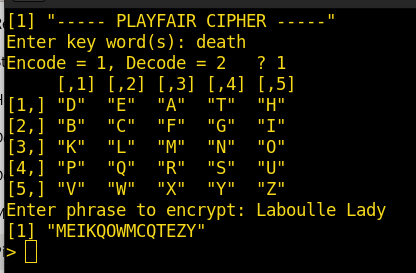
For the past several days, the weather here has been alternating between rain, snow, cold and wind. So what’s a person to do on days like that? Well, play on the computer comes to mind as one diversion during the less than nice weather. I started thinking of a way to reacquaint myself with “R” programming. I have played with it for a few years, but always in a hit-or-miss fashion, as there are many tasks that need doing around the ranch. But, when the weather is bad…
One thing I thought of is the Playfair Cipher, used for telegraph secrecy during World War 1 and the Boer War by the British, and by the Australian Islands Coastwatching Service during World War 2. It was easy to use during combat without special tools, charts or lists.
It is known as a polygraphic cipher in diagraphic form, and was the first literal diagraphic cipher. It encrypted two letters at one time, and, if any letter was altered the entire encryption was changed. Its structure made it difficult for cryptanalysis methods of the time.
More recently, the movie “National Treasure 2” used it during the course of the actors deciphering clues of “Cibola,” the city of gold. Unfortunately, it is fairly noticible the code groups shown early on in the movie didn’t match the code groups used later to decipher the phrase “Laboulle Lady” for finding further clues. But it’s only a movie, and the script writers used “artistic license” during the plot’s progress. The scheme the writers used didn’t really match the normal procedure of developing the 5x5 matrix to decipher a message, as described in (Wrixon 1998)
Just for the fun of it, let’s use the code groups from the movie, which kind’a, sort’a match a possible grouping for the clue used in the movie. For example, the key word ‘death’ is used to generate the matrix (leaving out the ‘J’ letter). The complete clue would have the following 2-letter groups:
LA BO UL XL EL AD YX<and be encoded as:
ME IK QO WM CQ TE ZY.The matrix used to encode and decode the letters would look like this:
    D  E  A  T  H
    B  C  F  G  I
    K  L  M  N  O
    P  Q  R  S  U
    V  W  X  Y  Z
The actual matrix would depend on whether the “IJ” letters were placed in the same box, or in this case, changing ‘J’s to ’I’s for encipherment. I found for this application (computer) it was easier to remove the ’J’ letter from the matrix. That’s because there are only 25 available spaces, not 26 as in the full alphabet.
Now, the matrix formation… Working from left to right and top to bottom, place the key word first. Then enter the alphabet, skipping the letters already present in the key. That’s all there is to that. The key word doesn’t really have to be only one word and/or no repeated characters. Just drop the spaces and repeats.
How does it work? Fairly simply. If there are two consecutive identical letters, such as in the word ‘BILL,’ there is an ‘X’ inserted between so both letters would not be in the same grouping. Also, another ‘X’ is added to make the last grouping contain two letters if it is short:
BI LX LXIf both letters in a group are in the same row, the next letter to the right of each letter is used. If in the last column, it wraps back to the first column in the same row.
If both letters in a group are in the same column, the next letter down one row is used for each. Again, if in the last row, it wraps back to the first row.
If the letters are in different rows and columns, a diagonal is formed. For example, in the above grouping, the last group ‘LX’ letters are respectively in row 3, column 2; and row 5, column 3. For consistency, the first letter’s diagonal is found first, then the second, to produce the encrypted group ‘MW.’
I found a small Python program online I modified that does the Playfair Cipher for Python2. However, I wanted to duplicate the encipherment functionality using “R.” The method I used is not necessarily efficient or compact, or even very good code. I duplicated each step of the process and got it working first, as I had no clue how to do it in “R.” So it was a hit-and-miss process. I knew if I attempted to do the entire process at once, I would get nowhere. The Python program mentioned above does that, but it is mostly unintelligible, as I don’t know a lot about the finer aspects of Python. I think the correct phrase would be “Jack of all Trades, Master of None!” But, hey I do this as a hobby, not because I have a job that requires it.
Anyway, the first step was to create the matrix itself, using a supplied key word. I used the ‘stringr’ package as I needed to do some serious string manipulation. To keep the program easy to decipher, I used a separate function for each major action; create the matrix, process the phrase to encrypt, and encrypt the phrase itself. Of course, it would be fairly useless if I had no way to then decipher the result, so that required another function for that.
Early on, I used lots of debug statements to keep track of things that did not go quite right (lots of those) and check each step’s progress. After a module worked, I could then comment out that statement to clean up the final result. That methodology worked well!
There are many functions/data sets built into “R,” such as the LETTERS character set which produces A-Z. However, I needed the letter ‘J’ not to be part of my matrix, so I made my own character string. More efficient than doing the following:
new <- paste(LETTERS,collapse="")   #Place elements in single string
new <- gsub("J","",new,fixed=T)     #Remove letter 'J'
cTlen <- str_length(new)            #Find string length
new1 <- ""                          #Pre-define object
x <- 1                              #Back to separate elements
while ( x <= cTlen ) { new1[x] <- str_sub(new,x,x); x=x+1 }
I show each step separately for readability. There may be other better ways to do the above, but I didn’t discover one, so again, this is quicker:
Letters <- c("A","B","C","D","E","F","G","H","I","K","L","M","N","O","P","Q","R","S","T","U","V","W","X","Y","Z")The matrix for encryption/decryption does not really have to look like a matrix to reference each letter, but for looking at and perhaps coding by hand, it is nice to see the matrix in the right orientation. And, it looks prettier. 😃️
It’s also easier and error free to let the computer do it! I think I will continue this post in a new installment, as this is getting rather long. So until next time, God Bless, be safe and wear your mask as the touted vaccine (and all its variations) doesn’t seem to work very well, or for very long. Makes you wonder…