.program pulse_train
; Repeatedly get one word of data from the TX FIFO,
; stalling when the FIFO is empty. Write the least
; significant bit to the OUT pin group.

.wrap_target
    pull
    out pins, 1
.wrapPico Pulse Position Modulation
electronics
pico
In a couple of earlier posts, I talked of my adventures with arbitrary waveform generation on the Pico. These were pico_awg and pico_awg_2. In those I ran into a roadblock where I could not get the direct memory access (DMA) to reset for new input after the initial setup. In my case, that limited the usefulness for me, as I wished to use A/D conversion to change the frequency, waveform and other factors. Surprisingly enough, the next day I stumbled across the Siglent SDG1032X in the most recent issue of QST Magazine, where they did a review of that test instrument.
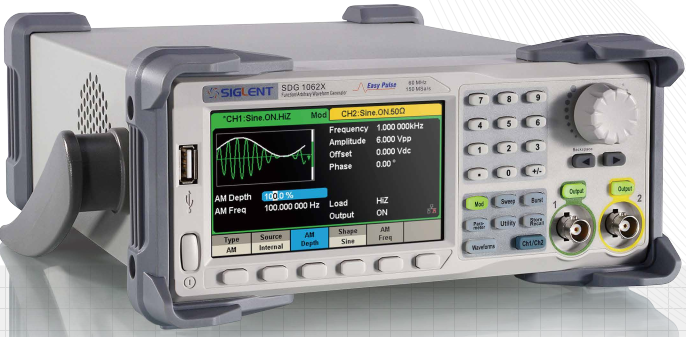
So, that fits the bill for that sort of thing for the test bench. A piece of software that allows creation of specific user waveforms only works in WindoZe, so that’s not useful. So I decided to push on with the Pico to create a pulse position modulation (PPM) program that would allow me to position pulses wherever I wished, and ultimately change the individual pulse width. That endeavor is this post.
The DMA issue was not working, but I decided to continue with programmable Input/Output (PIO) as the vehicle to generate my desired signal, as it is very fast. In fact, the basic pulse width is ~ 100 nS width. The PIO is useful for creating a state machine that may not be available in the Pico itself. However, in this case I only need a simple assembly program to turn a pin on or off, using a word pulled from a first in/first out (FIFO) and sent to the pin.
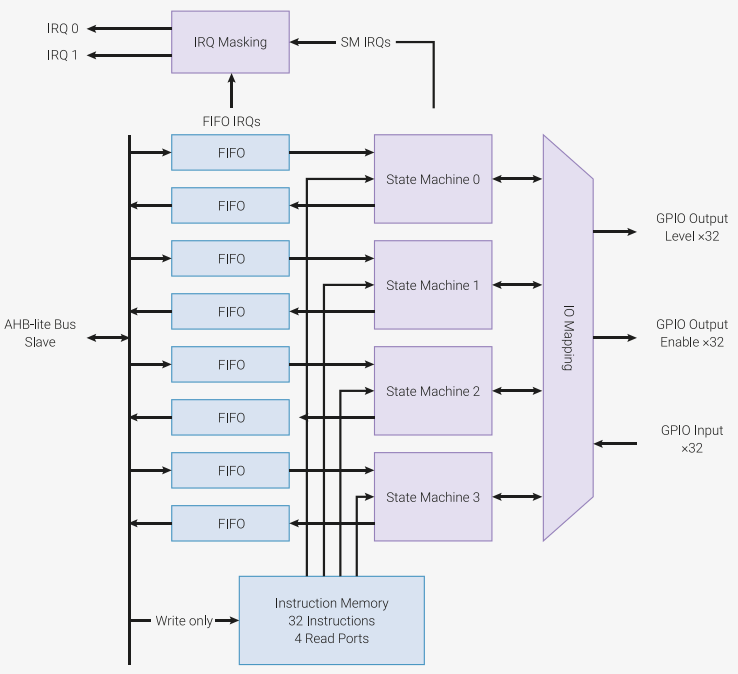
Each PIO instance includes four state machines that can each run instructions stored in shared instruction memory. This memory can hold 32 instructions, and each state machine can utilize any of the instructions. Each state machine can also control any of the GPIO1 pins on the Pico. Way overkill for my simple application, but extremely handy! Firstly, we create the simple assembly program to load into the state machine.
All it does is pull a word from the FIFO and send it out the selected pin, then wraps. Very simple and very fast! To setup and load the program we have a C helper program, part of the same pulse_train.pio file.
% c-sdk {
static inline void pulse_train_program_init(PIO pio, uint sm, uint offset, uint pin) {
    pio_sm_config c = pulse_train_program_get_default_config(offset);

    // Map the state machine's OUT pin group to one pin, namely the `pin`
    // parameter to this function.
    sm_config_set_out_pins(&c, pin, 1);

    // Set this pin's GPIO function (connect PIO to the pad)
    pio_gpio_init(pio, pin);

    // Set the pin direction to output at the PIO
    pio_sm_set_consecutive_pindirs(pio, sm, pin, 1, true);

    // Load our configuration, and jump to the start of the program
    pio_sm_init(pio, sm, offset, &c);

    // Set the state machine running
    pio_sm_set_enabled(pio, sm, true);
}
%}
The CMake program assembles it into a header file which we then include into the main C++ program file.
#include "pulse_train.pio.h" // Our assembled PIO programOne thing I want to describe, and I wish the Pico board had, is a RESET switch. It doesn’t, but there is a simple workaround. By connecting a normally open (NO) switch from ground to the RUN signal on pin 30, we have the reset function. That makes is much simpler to load a program without wearing or damaging the USB jack from constant plugging and unplugging. Another difference is I am using specific functions of the using namespace std;. That looks like this.
using std::cin; using std::cout; // define data streams used
using std::endl; // similar to "\n" for newline
using std::__cxx11::string;
Unfortunately, it doesn’t affect the file size much, but it is a different method, and is handy in determining exactly which functions are used in the std namespace. Of course, one drawback to this simple program is having to use a computer to change/enter input. But hey, it works!
All the steps of setting up the PIO could be placed into a function, but then there are issues with global variables, so I just put them in the main() portion of the program, as they are simple.
// setup variables
stdio_init_all();  // set up to access USB via minicom
sleep_ms(2000); // give minicom time to catch up

uint OUT_PIN_NUMBER = 11; // output on GPIO 11 (pin 15).
// Choose which PIO instance to use (there are two instances)
PIO pio = pio0;

/*  Our assembled program needs to be loaded into this PIO's instruction
    memory. This SDK function will find a location (offset) in the
    instruction memory where there is enough space for our program. We need
    to remember this location! */
uint offset = pio_add_program(pio, &pulse_train_program);

/*  Find a free state machine on our chosen PIO (erroring if there are
    none). Configure it to run our program, and start it, using the
    helper function we included in our 'pulse_train.pio' file. */
uint sm = pio_claim_unused_sm(pio, true);
pulse_train_program_init(pio, sm, offset, OUT_PIN_NUMBER);
After the PIO is setup and running, we want to enter the parameters for operation, namely the frequency and pulse train. The frequency is just how far apart the pulse trains will be, and is not very accurate, although I made a minor effort in adjusting the spacing. In this case, I was more interested in the pulses themselves. So, let’s get some values into the program.
string freq; // for frequency
string string1; // for pulse string

cout << endl;
cout << "\n\n*** Pico 100 nS Pulse Train Generator ***\n" << endl;
cout << "Enter the desired frequency in Hz:" << endl; // for variable frequency
cin >> freq; // get frequency string
cout << "Enter pulse sequence (0s and 1s only):" << endl;
cin >> string1; // get sequence string
cout << "Freq:" << freq << ", String:" << string1 << endl;

auto len = string1.size(); // find length of entered pulse sequence
string1 = string1+"0"; // last pulse was short, so add 'short 0' at end.
// determine uS delay between pulse groups (minus pulse group width).
float dely = (1/(stof(freq)*1e-6))-len*0.1; // each 1 or 0 state is 100 nS.
int del = int(dely); // round off for sleep_us().
if(del<=0) del = 1; // 1 MHz is 1 uS.
cout << "Calculated delay (uS): " << del << ", String length: " << len << endl;
Notice the auto used for finding the variable type we use to store the length of the entered pulse. This lets the C++ SDK determine the type of variable at compile-time. Some of the above cout lines are for testing, and can be deleted. Another quirk I noticed was the last pulse was short, so I added another ‘0’ pulse to the end of the string to be short, instead of the last real pulse. That’s the line where I am concatenating a string with a literal. Additionally, I noticed the GPIO pin started high, so the below line ensures the pulse sequence starts low before the first pulse.
pio_sm_put_blocking(pio, sm, 0); // set to low for sequence start.The rest of the program is sending the entered string to the GPIO pin each character at a time using a range-based for loop. The last line pauses the while loop, based on subtracting the entire pulse train length from the delay for frequency. However, as the delay is in micro-seconds, the actual delay is not very accurate.
while (true) {
   for(auto c:string1) {
      pio_sm_put_blocking(pio, sm, c);
   }
   sleep_us(del); // delay between groups based on frequency entered
}
No other external components are used in this simple circuit, just the Pico and a push button. Using the minicom terminal program, we see this interaction with the Pico.
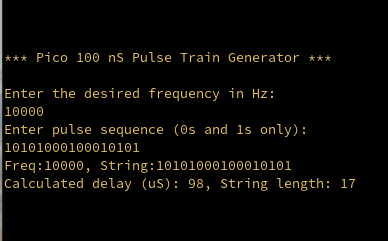
Notice the String line where we input 10101000100010101 for the pulse string. This translates into the waveform output as shown below.
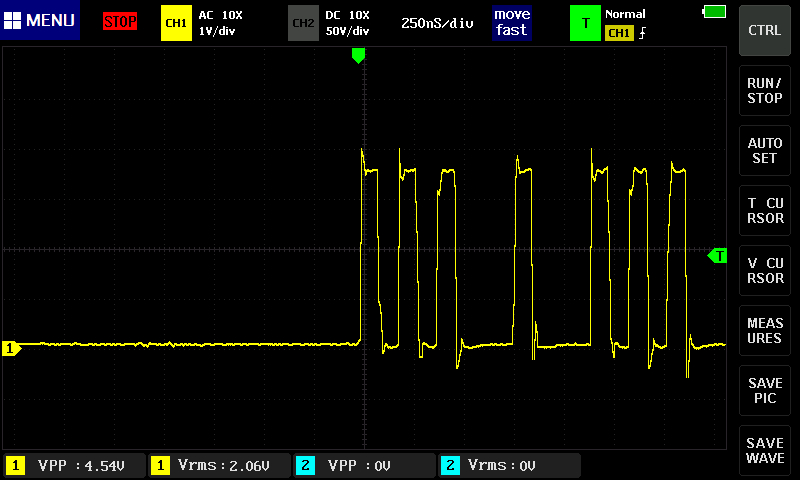
A 1 is the high pulse and a 0 is a low. The three zeros surround a lone high, followed by the rest of the pulse train. Each pulse, low or high, is about 100 nanoSeconds wide. Adding a sleep line inside the for() loop would allow variation of pulse widths. There is no function in the FNIRSI Tablet portable oscilloscope to limit the bandwidth, so the signal is rather noisy. I also notice the o’scope picture taking function wraps the image, making it unusable.2 But that’s for another post, perhaps. You get what you pay for (and sometimes you don’t), especially from China!
And making the pulse position program was really simpler than I thought it would be, program-wise. The Pico can do so much for such a small package!
God Bless, and have a great day! We are enjoying snow today, which will translate into a beautiful spring with lots of flowers! Bye for now.