DJI Drone Logs
This follow-up to DJI Mini 3 Video Manipulations will investigate the DJI drone log files that are recorded for each flight.
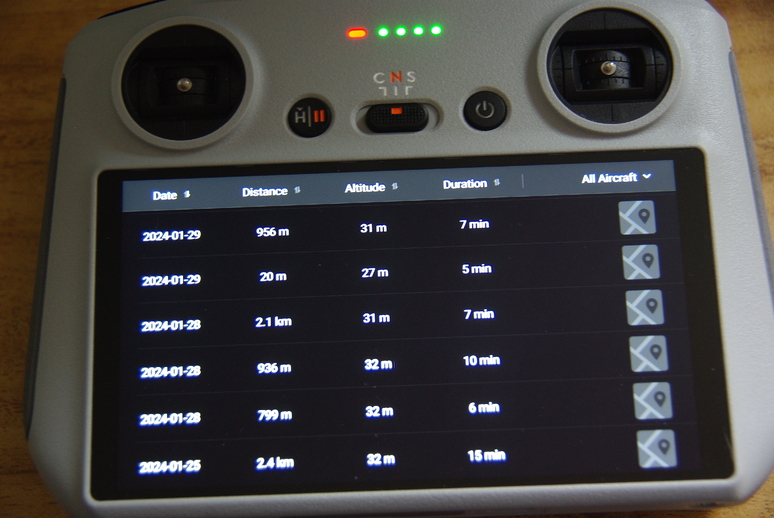
Shown at the top of that window is the drone’s total distance flown, total flight time and total number of flights. These files are accessed from the RC controller following the below steps.
- Turn RC controller on.
- Select Profile at bottom of screen.
- At bottom of the Profile screen, select the More button.
- The flights are shown in the Flight Data Center screen.
- To view a particular flight, tap on that line, which shows the flight profile.
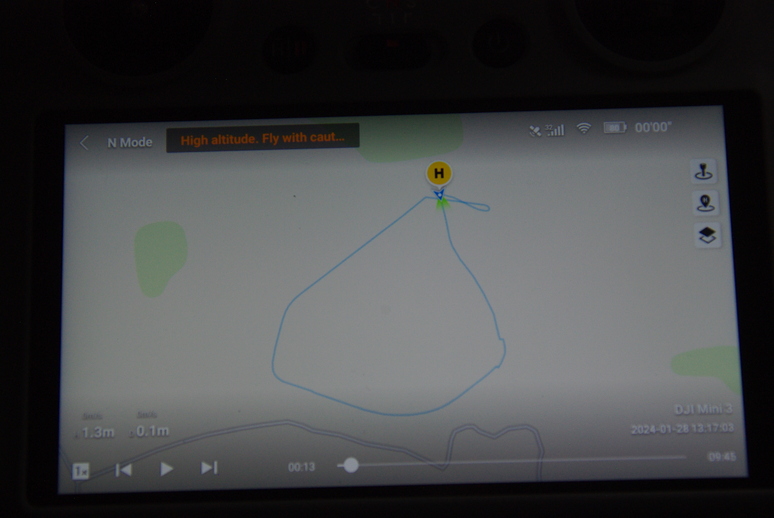
One of the overlays available is the satellite view, which plots the flight on the terrain. The flight can be manipulated by dragging the progress bar at the bottom of the screen.
There is much more data available in the log files stored on the drone’s SD card. However, of late, it seems DJI has encrypted those files. Assuming I am using the correct files (I found no others), they are on the drone’s SD card here: MISC/LOG/flylog/fc_log.log. The two other files under the LOG directory are camera_log.log and linux_log.log.
There is a post here that uses a Python file (older version) that attempts to decrypt, but it doesn’t work. I’m not too familiar with Python, but I noticed the print(““) functions are old-style, but even after that update still gives errors in other python libraries, where TypeError: Object type <class ‘str’> cannot be passed to C code. I don’t know how to fix that. So I tried to convert the strings to hex as such:
key1 = "YP1Nag7ZR&Dj\x00\x00\x00\x00"
iv1  = "0123456789abcdef"
key = bytes(key1, "utf-8")
iv = bytes(iv1, "utf-8")
but then received the error TypeError: ord() expected string of length 1, but int found. Not sure where to go with the Python code from here.
I verified the key and iv fields where key = “YP1Nag7ZR&Dj” and iv = “0123456789abcdef” as such (ASCII to HEX):
- printf ‘YP1Nag7ZR&Dj’ | od -t x1c
- printf ‘0123456789abcdef’ | od -t x1c
giving key as:
0000000  59  50  31  4e  61  67  37  5a  52  26  44  6a
          Y   P   1   N   a   g   7   Z   R   &   D   j
0000014
and iv as:
0000000  30  31  32  33  34  35  36  37  38  39  61  62  63  64  65  66
          0   1   2   3   4   5   6   7   8   9   a   b   c   d   e   f
0000020
or, alternatively, in a slightly different format:
- echo ‘YP1Nag7ZR&Dj’ | hexdump -C
- echo ‘0123456789abcdef’ | hexdump -C
The two fields match the suggestion on this site where I found the following:
- openssl enc -d -nosalt -in fc_log.log -aes-128-cbc -K 5950314E6167375A5226446A00000000 -iv 30313233343536373839616263646566 -out decrypted.log
I suspect the key field has again been changed in some of the later firmware updates, suggested by this message:
bad decrypt
004EFCEA087F0000:error:1C800064:Provider routines:ossl_cipher_unpadblock:
bad decrypt:providers/implementations/ciphers/ciphercommon_block.c:124:
So for now, I am still searching for an answer for the Linux side of the house. If one wished to view the files themselves, the following will display the hex rendition:
cat fc_log.log | hexdump -C | moreThere is information on the format of the DJI log files here that attempts to explain the file format, but I’m not sure how up-to-date it may be as it shows the latest software is dated May 2021. I tried to use the programs on the file mentioned above, but got the following error:
File version number: 0xff
Bad 'recordsAreaEnd' 184716002660 (0x2b01ee8564) and/or 'detailsAreaSize' 65535 (0xffff); file size is 104861696
There are several log file decoders, but all seem to be for Windows OS, and not for Linux. So, the search continues…
Have a great day in the Lord Jesus, and if you don’t know Him as your Lord and Savior, there’s no time like the present to change your life for the better. God Bless!