This is a continuation of the Fun With PI and Circle Squarers subjects of the earlier posts, but deviates a bit into areas of precision. It also gets a bit more specific with C++ rather than R programming, although the main subject applies to both posts.
I mentioned in those posts about several formulae by several mathematicians for determining the value of \(\pi\). Those formulae could generate lots of digits. The real problem I have is finding that whether using R or C++ gives the same basic problem: displaying accurate values. It’s fine that digits are generated, but if by displaying them, the output lacks the precision of the original values, what is the point? Keep in mind I am not disparaging any particular programming language here, just the output limitations of the hardware and software of maintaining a particular level of clarity in the display of those calculated values. It is too easy to assume that a particular program generates meaningful data, when most likely, it produces garbage digits.
Hence, to the meat of the matter (nothing to do with a person’s particular choice of diet). In the above mentioned posts and this one, I touch on the generated value of \(\pi\) and the various outputs. For example, the first thirty verified digits of \(\pi\) are 3.141592653589793238462643383279. Much more than are needed to do most anything to any precision required or desired. As mentioned in the “Circle Squarers” post;
“Just as a point of fact, the NASA JPL scientists and engineers use only 15 digits in their calculations. To put this in perspective, calculating the circumference of a circle with a radius of 12.5 billion miles1, the error using 15 digits of \(\pi\) is only 1.5 inches. Even using the size of the visible universe with a radius of 46 billion light years, you only need about 40 digits to calculate the circumference with an accuracy of the width of a hydrogen atom.”
I won’t go into attempting to prove the above statements. You may if you like… Anyway, the real issue is liking to know what the computer regurgitates is actually useful data, not just junk! These days, too many folks assume what the computer (or calculator) shows is really right and not just meaningless numbers. And, if they are meaningless, why use them? Does the end user really know what is useful or not? For example, can the user who uses the computer or calculator to add 1 + 1 really determine that? I know (hope) the previous example is really the extreme!
So, onward and upward… Here I will attempt to provide some basic (uneducated) examples to show what I have discovered about the basic limitations of the C++ language; and for that matter, virtually all programming languages where the digits are represented by bytes in memory.
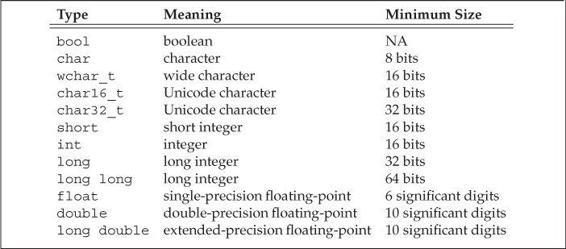
Arithmetic Types in C++
The above table indicates sizes of the various definitions used in many programming languages. However, some compilers may use different values than shown above. The bool line NA value indicates values of TRUE or FALSE, represented in memory as a 1 or 0. Notice the Minimum Size column representing size of memory used. That value may be more or less and really depends on the compiler used (for a compiled language like Python, C or C++). Some languages may have the ability to define additional types, but still may depend on combinations of already defined types as shown above. C++ has an enumeration capability, but I don’t know anything about its capabilities right now.
I won’t show code from the earlier posts using R, but will present C++ examples which indicate where the built-in precision falls short. First a simple program adapted from C++ Primer (Stanley B. Lippman 2013), but using the extended value of \(\pi\) to show how different manipulators represent the same value using std::cout.
Code
#include <iostream>using namespace std;int main(){ long double pie =3.141592653589793238462643383279; cout <<"default format: "<< pie <<'\n'<<"scientific: "<< scientific << pie <<'\n'<<"fixed decimal: "<< fixed << pie <<'\n'<<"hexadecimal: "<< hexfloat << pie <<'\n'<<"use defaults: "<< defaultfloat << pie <<"\n\n"; return 0;}
The question is, “Does even the long double store the complete number correctly in memory?” One path to discovery would be to peruse the compiled program where the constant was stored and examine it. I don’t currently have a piece of software to do that, but any disassembler or program to examine a hex file would do nicely. A simple program to show what happens to the defined constant is presented below.
Code
#include <iostream>using namespace std;int main(){cout.precision(20); double pie =3.14159265358979323846; long double pie1 =3.14159265358979323846; cout << pie << endl << pie1 << endl;}
I posted the above at StackOverflow to see if anyone would respond to enlighten me as I am not a programmer; it’s only a hobby for me. Something to keep my brain active as I age… BTW, this is the output:
3.141592653589793116
3.141592653589793116
As can be seen, neither variable definition is presented correctly. Is this a shortcoming of the std::cout display function, or storage of the original constant? I don’t know at this point, but I hope someone will have an answer…
Have a great day in the Lord Jesus Christ, and may God Bless you and yours. I hope you enjoy these posts, but whether you do or not doesn’t really matter, I enjoy producing them. Keeps me conversant in R programming.
References
Stanley B. Lippman, Barbara E. Moo, Josee Lajoie. 2013. C++ Primer, Fifth Edition. Addison-Wesley.