Code
#include <iostream>
#include <cmath>I have been recently investigating C++ as I was programming the Pico and LoRa modems for remote links, and thought I would just drop in a little post here about other C++ efforts I have been playing with. This one is concerning calculating double integrals using C++. Now, given that many calculators will calculate single integrals as built-in functions, few will perform double integrals easily. A double integral looks a bit like this:
\[\sideset{}{_{-100}^{100}}\int{\sideset{}{_{-20}^{20}}\int{40 - 0.03 x^{2} + y}} \: dx \: dy\]
This is the formula we will use to determine the area of a building 200 feet long and 40 feet wide with a domed (rounded) roof where the peak is 40 feet. The \(0.03x^2\) gives the parabola (or profile) of the roof, where the parabola opens down. This post, Curve fitting gives some parabola information about doing something along those lines, and how to determine an actual formula.
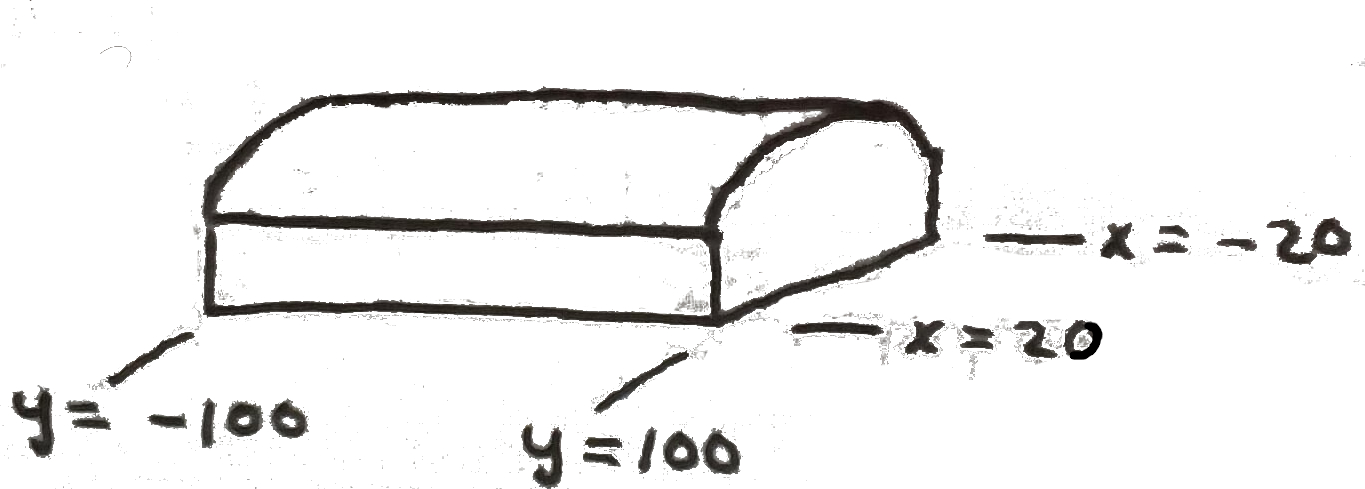
Now, if we wished to perform this on a Casio Prizm (fx-CG50) calculator, my favorite calculator, it would have to be broken into separate steps, such that the x and y, being separate calculations, would be multiplied for the total:
\[\sideset{}{_{-20}^{20}}\int{40 - 0.03 x^{2}} \: dx \: = 1440\] \[\sideset{}{_{-100}^{100}}\int{1440 + y} \: dy \: = 288,000\]
The total then is 288,000 cubic feet. So, suppose we wanted to perform the same calculation using C++, all at once, instead of separate. And, that is the real purpose of this post. DISCLAIMER: I did not develop these algorithms, although I have modified them a bit to fit my use case. These were pieced together from several sources (as I often do) to suit my purposes.
We need use only two STLs1 in this short program: iostream and cmath.
#include <iostream>
#include <cmath>This example has the actual formula, shown at the top, hard coded into the program for simplicity. Modifying to allow different formulae and values makes the program much longer and complicated, and obscures the basic functionality. We have two functions defined to do the heavy lifting:
double f(double x, double y);
double doubleIntegral(double xMin, double xMax, double yMin, double yMax, int n);
void intro();
The last function is eye candy to display a brief intro and information about the program. I am also using the suggested format for variable definitions used in later versions of C++17 (Cyganek 2021), such as removing ambiguity from defined variables which are not assigned an immediate value. In the past, I have defined variables like: double x, y;, which is ok but can leave the variable in an undefined state, and can cause problems that are extremely difficult to find. The suggested method is: double {0.0}, which assigns a definite value to that variable. Of course, if the variable is given a value when defined, either method works. So the line: double a, b, c; is replaced with: double a{}, b{}, c{};, ensuring it has a value (of zero in this case).
I also prefer to use: using namespace std;, so if I have any cout, cin, endl statements in the code, I don’t have to use std::cout, etc. However, it is also good practice to denote which library a statement comes from for clarity, and the std:: format does that.
Because we have placed the functions separately, the main() body is short and concise:
int main() {
    intro(); // Eye candy
    double xMin = -20, xMax = 20, yMin = -100, yMax = 100; // Do inner first, then outer
    int n = 1000; // Number of subdivisions
    double result = doubleIntegral(xMin, xMax, yMin, yMax, n); // Function
    cout << "The double integral result is: " << result << std::endl; // Display
    return 0; // Function type (int) defines return value
}
Now the actual functions we defined above:
void intro() {
    cout << "===========================\n";
    cout << "Calculate Double Integrals.\n";
    cout << "===========================\n";
    cout << "Example:\n";
    cout << "40 -0.03 * x\u00b2 + y\n";
}

double f(double x, double y) {
    return 40 - 0.03 * x * x + y;
}

double doubleIntegral(double xMin, double xMax, double yMin, double yMax, int n) {
    double dx = (xMax - xMin) / n;
    double dy = (yMax - yMin) / n;
    double integral = 0.0;

    for (int i = 0; i < n; ++i) {
        for (int j = 0; j < n; ++j) {
            double x = xMin + (i + 0.5) * dx;
            double y = yMin + (j + 0.5) * dy;
            integral += f(x, y) * dx * dy;
        }
    }
    return integral;
}
The actual formula is defined in the second function, f(), which the last function, doubleIntegral(), uses as it iterates through the x and y ranges, and adds in the last line of the for() loop. Notice in the main() body, the integer value of n. This determines the width of each slice of the formula’s defined area, and ultimately determines the accuracy of the result.
So, there you have it, in a short, simple program. If you wished another formula, you would modify the f() function, and the ranges defined in the main() body, recompile the program, and enjoy the result. However, if you wanted to enter different values and formula parameters, you would modify the program to accept inputs, inject those inputs into the function f(), and recompute. This would require a safe way to change the formula such that the new parameters would be assembled into a new variable, keeping in mind the f() function needs to be set before the doubleIntegral() functions uses it.
That’s all for this subject. Have a great day, and may God Bless you and guide you daily as you go through life! Bye!
C++ STL, or Standard Template Library, (commonly called SL) is a collection of template classes and functions in C++ that provides common data structures and algorithms, such as lists, stacks, and sorting functions. It allows for efficient and flexible programming by using generic programming techniques.↩︎