As in LoRa Project Part 1, we continue with our effort to create a viable system where one LoRa module (Client) can send messages to another LoRa module (Server), known as peer-to-peer (P2P). Since the last post, I have had to do some troubleshooting to determine why things were not working. The first part detailed the preliminary setup to prove the functions to provide access to the registers, set the frequency and build a packet for transmission.
Some of the steps I did to investigate why the packet/message appeared not to be sent or received are as follows.
Firstly, I verified both the Client and Server worked with the Python code.
Secondly, I replaced the Client Python code with my version of C++, but no message was received by the Python Server.
Next, I swapped the Server Python code with the Server C++ code, and replaced the Client Python code, and was able to successfully receive a message.
After investigating the C++ code for the Client, I discovered I had swapped the addresses for the FIFO.1 The default values for the TX and RX FIFO buffers are 0x80 and 0x00 respectively. Since I use the same function file for both ends, the TX FIFO was placing the header and message in the correct place, which I verified by re-reading the FIFO before sending, but the receiver was looking in the wrong place, so just printed garbage.
By placing the TX and RX values back to the default, things worked just fine, and I was able to send and receive messages.
The next area I stumbled with was reading the SNR and RSSI values to display. It seems only the SNR register is in two’s complement format,2 where other registers are in uint8_t format. This created incompatibilities with displaying the correct values. The culprit in this case is cout. I tried all different formats to attempt to get correct values displayed, with no success. So, I then retreated back to the older printf() statement, which worked fine the first time, Woo Hoo! The reason I spent so much time on this simple bit was misinterpreting things, or maybe being misled by my own results. For example, when I run up against problems like this, I write a standalone program to determine what may be the problem. In this case what worked flawlessly in one instance refused to work in another. This is that program:
Code
// print twos complement of uint8_t value#include <cstdint>#include <iostream>#include <bitset>using namespace std;int main() {printf("\033c"); // clear terminal screen uint8_t original =0x7a; //-122 int8_t twosC = static_cast<int8_t>(original); // twos complement int8_t twosCa =~(original)+1; // twos complement cout <<"\n --- Twos Complement Conversion ---\n"<< endl; cout <<"\nOriginal: \t0x"<< hex << static_cast<int>(original) <<"\tBits: "<< bitset<8>(original) << endl;// bits can be added to printf() with %b, but truncates leading zeros. cout <<"\nConversion: int8_t var = static_cast<int8_t>(original);"<< endl;printf("\t\t%d\t", twosC); cout <<"Bits: "<< bitset<8>(twosC) <<"\n"<<endl; cout <<"Conversion: int8_t var = ~(original)+1;"<< endl;printf("\t\t%d\t", twosCa); cout <<"Bits: "<< bitset<8>(twosCa) <<"\n"<<endl; return 0;}
The issue was that the same statements which worked here did not work on the Pico microcontroller. So as mentioned earlier, printf() was the answer. So, for that section, it ended like this:
Code
// get SNR (twos complement), and RSSI valuesread_register(REG_19_PKT_SNR_VALUE, &id, 2); // get SNR value, 2s complement value ???int8_t snr = (id/4.0);read_register(REG_1B_RSSI_VALUE, &id, 2); // get RSSI value, p. 83int8_t rssi = static_cast<int8_t>(id);read_register(REG_1A_PKT_RSSI_VALUE, &id, 2); // get RSSI value, p. 83int8_t pktRSSI = static_cast<int8_t>(id);if( snr <0) { rssi = (-157) + rssi + snr; // use snr in calculationprintf("RSSI: %d dBm\n", rssi); // cout WILL NOT display correctly} else { rssi = (-157) + (16/15) * rssi;printf("RSSI: %d dBm\tSNR: %d dB\n", rssi,snr); // cout WILL NOT display this value correctly}
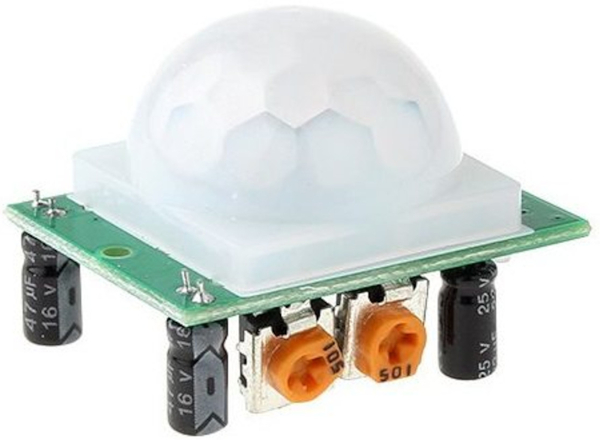
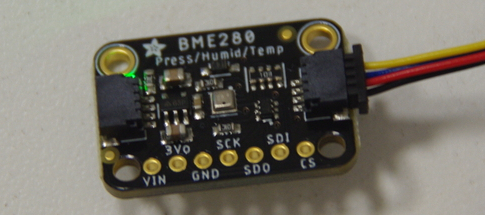
So, now we can continue with the progress we have made. We have successfully sent and received messages and displayed the RSSI and SNR values. Our next effort involves adding the HC-SR501 PIR sensor3 and BME280 sensor modules.
HC-SR501 PIR sensor.
This will allow transmission to the Server, motion sensor data, humidity, barometric pressure and temperature at the location of the Client. As mentioned in the LoRa Project Part 1 and used in the Pico Remote Weather Station post, we will reuse a lot of the functions (with modifications) from that RFM69HCW transceiver effort.
BME280 weather sensor
As an aside, I suspect the LoRa module can talk with the RFM69HCW module, using FSK/OOK4 modes, as both can send packets, but have not investigated that.
As a general outline of the process taken in this effort, we first initialize the modules to use particular GPIOx5 pins for data transfer, using SPIx6. In the US, the frequency used is 915 MHz, so we set that for both modules. The LoRa module is capable of operation around 434 MHz also. In fact that is the default value for the module. However, that is in the 70 cm Amateur Radio band, not an ISM7 frequency for the US. Although I could legally operate it there and obtain greater range, the antenna would be larger. Also, the other modules I am experimenting with are also at 915 MHz, so I will stay there.
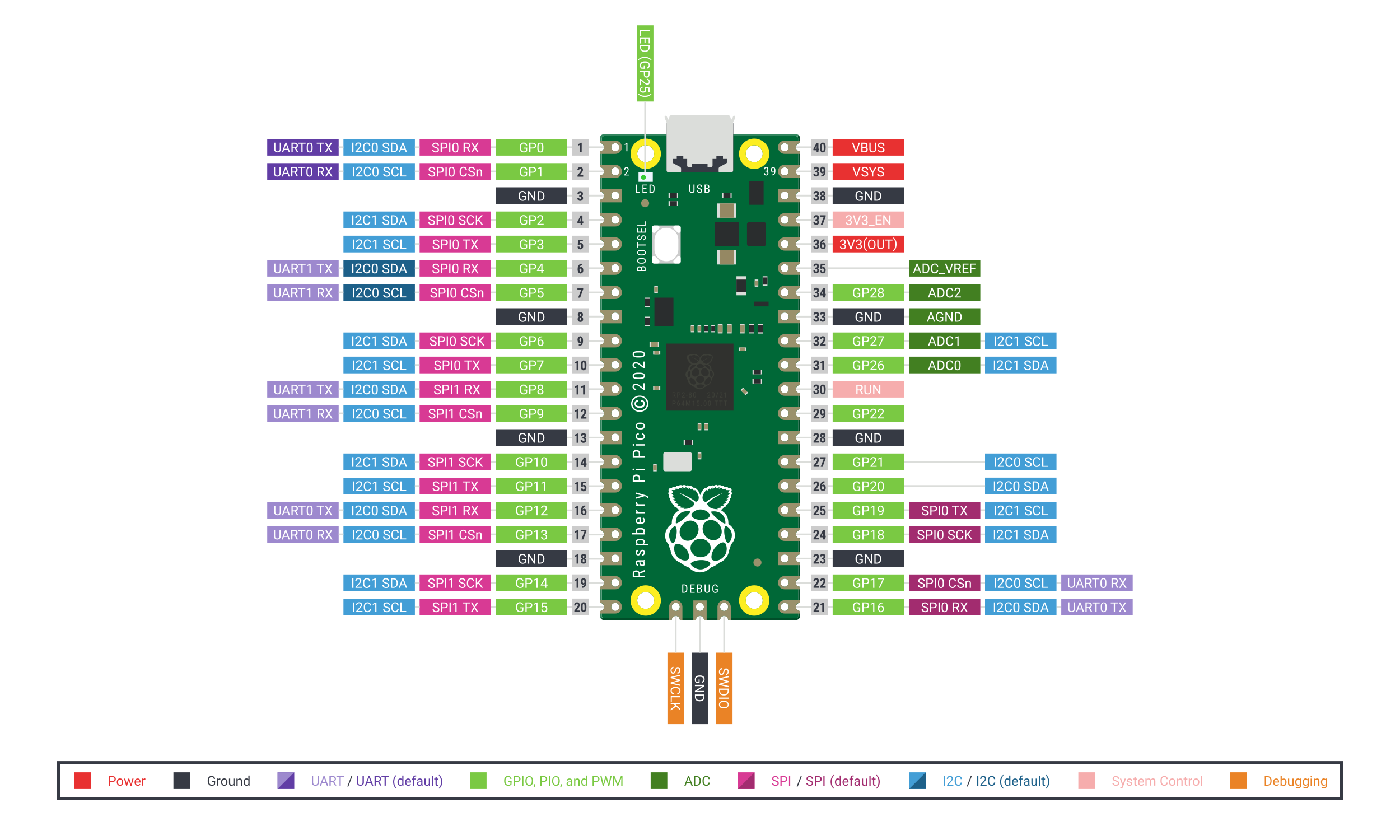
Pico/Pico2 pinout.
In this particular case, we have separate directories to manage the software, one for the client, the other for the server. However, both use the same function, header and register files, placed in a top level directory, then soft linked to the client/server directories. This allows easier editing and maintenance, and prevents the files from diverging between directories. Of course it can be done in any way the programmer wishes. This particular method keeps the build files in separate directories and eases the chore of uploading the filename.uf2 files to a particular Pico.
I have a real issue with interrupts, and never had much success making them work. Plus it complicates things considerably. I’ve found I can use flags just as easy, and save myself headaches. In more time-critical applications, I’m sure they would be more useful. For both the RFM69HCW and the RFM95X, I use something like the code below.
Code
// Routine for transmission completed (Client)static int packet_sent() { // check for TX_DONE flag, 0x08 unsigned char id;read_register(REG_12_IRQ_FLAGS, &id, 2); uint8_t val = (id & TX_DONE) >>3; // move bit 4 to bit 1 return val;}// Routine for reception completed (Server)static int payload_ready() { // check for RX_DONE flag, 0x40 unsigned char id;read_register(REG_12_IRQ_FLAGS, &id, 2); uint8_t val = (id & RX_DONE) >>6; // move bit 7 to bit 1 return val;}
These then loop, waiting for the appropriate flags to be returned, as follows, the first for TX, the second for RX:
Code
while(!val) { // wait for TX_DONE flag val =packet_sent(); }// and:while(!val) { // wait for RX_DONE flag val =payload_ready(); }
For the PIR module, one Pico pin is designated as an input for the PIR signal. This signal then determines the message content that is sent to the Server, such as “Motion Detected”, or something similar. Otherwise, a normal message is constructed from the BME280 sensor data and sent to the Server. So, the Client serves a dual purpose. Other sensors could be added if desired.
The BME280 sensor is polled to get the latest data, assembled into a formatted message, then passed to the function to build and send the data to the Server. The BME280 code is:
Code
Sensor.bme280_read(&humidity, &pressure, &temperature);// Concatenate strings and variables together if(temperature/100.0>=15.6) {pVar=3376.85; } else {pVar=3386.38; }string humVal =to_string(humidity /1024.0); // convert double to stringhumVal =humVal.substr(0,4); // three digitsdouble tpVal = (temperature/100.0)/.55555556+32; // find temperature fahrenheitstring tempVal =to_string(tpVal); // convert double to stringif(tpVal >=100) { tempVal =tempVal.substr(0,3); } else { tempVal =tempVal.substr(0,2); } // four digitsstring pressVal =to_string(pressure / pVar); // convert double to stringpressVal =pressVal.substr(0,5); // five digitsstring message ="T: "+ tempVal +" F\nH: "+ humVal +" %\nP: "+ pressVal +" inHg\n"; // assemble complete messagebuild_packet(SERVER, CLIENT, identifier, flags, message);sleep_ms(5000); //5 seconds
The above code block is placed in a while() loop in the main body of the Client program. A part of the message-building function also checks the PIR pin for any signal present. I have the Client send a message every 5 seconds, and the PIR delay set to 7 seconds. This allows at least two messages to be sent to the Server if motion is detected. The function looks like this:
Code
static int build_packet(uint8_t SERVER,uint8_t CLIENT,uint8_t identifier,uint8_t flags, std::string message) {write_register(REG_01_OP_MODE, STBY_MODE); // LoRa FIFO can only be filled in stand-by modeif (checkPIR()) { // get PIR pin status message ="\n===> MOTION DETECTED! <===\n";blinkLED(); // LED indicator on the Client }write_register(REG_0D_FIFO_ADDR_PTR, TX_BASE); // set message start point auto mLen =message.size()+4;// add length +4 header bytes and message to payload vector, then put in FIFO vector<uint8_t> payload; write_register(REG_00_FIFO, SERVER);write_register(REG_00_FIFO, CLIENT);write_register(REG_00_FIFO, identifier);write_register(REG_00_FIFO, flags);for(const int& i : message) { write_register(REG_00_FIFO, i); } uint8_t val =0;// set TX modewrite_register(REG_22_PAYLOAD_LENGTH, mLen); // set payload lengthwrite_register(REG_40_DIO_MAPPING1, DIO0_TXdone); // set DIO0 for TxDone interruptwrite_register(REG_12_IRQ_FLAGS, 0xff); // clear IRQ flagswrite_register(REG_01_OP_MODE, TX_MODE); // transmit packetwhile(!val) { // wait for TX_DONE flag val =packet_sent(); }// After TX_DONE flag, radio returns to STBY_MODE cout <<"Packet sent."<< endl; return 0;}
I also use both Picos’ built-in LED as an additional signal, motion detected for the Client, and message received for the Server. Upon receipt of a Motion Detected message from the Client, the Server could process it further, such as sounding an alarm, etc. But that’s perhaps for another episode, as this post is long enough.
So, have a great day in the Lord Jesus Christ, and may God watch over you and yours. Until next time…
Footnotes
FIFO is a first-in/first-out buffer, usually one byte wide.↩︎