Code
double dms2dd( double D, double M, double S) {
  return D + (M/60) + (S/3600);
}About five years ago, I did a post on Vincenty Direct, using the R Core Team (2025) programming language. This post, I am doing on Thaddeus Vincenty also, but using C++ instead. And on the inverse formula, which is used to determine the distance between two GPS1 locations, while also giving the starting and ending heading angles.
This effort and post were prompted by this post, where I discovered that, even though I had a program on my calculator, I didn’t have anything for the computer. So, this is the result. Besides it gives me some additional practice using C++.
I did encounter a few issues converting from calculator format to C++ format. One issue was the calculator using arctangent as tan-1(x), where C++ uses atan(x) for the same function. They are not the same function!
Another issue is the calculator automatically handles digital and Do M’ S” data points. C++, on the other hand needs to be told how to determine the same. Converting from one to the other is trivial, but still needs to be computed. For example, a simple way is this function, used to convert DMS to DD.ddd:
double dms2dd( double D, double M, double S) {
return D + (M/60) + (S/3600);
}To convert from digital degrees to DMS, the function is slightly more complicated if a pretty display is desired. This function does that, and renders an answer as part of the function:
void dd2dms2(double DD) {
  double Deg{}, Min{}, Sec{};
  Deg = floor(DD);
  Min = (DD - Deg)*60;
  Sec = (Min-floor(Min))*60;
  Min = floor(Min);
  cout << fixed << setprecision(0)<< Deg << "\u2070 " << Min << "\' " << fixed << setprecision(2)<< Sec << "\""<< endl;
}
Notice the Unicode character (\u2070) for the degree symbol in the last line. Also note that there is no return statement as there is nothing to return, so the type is void. I will not attempt to repeat the Vincenty formulae here, as there are quite a few, and they can be found lots of places on the Internet. Although I admit to temptation, as I like to render formulae as part of a post, and believe it makes it more interesting and complete.
As the Earth is not a billiard ball, but an oblate spheroid, meaning it is slightly flattened at the poles and bulging at the equator due to its rotation. This gives us some data to work with, using the actual shape. For example, the critical measurements are shown below, and allow us to determine with great accuracy the distance and bearing for starting and ending coordinates:
This translates into the following constants for the program:
const double a{6378137.0}; // WGS84 semi-major axis, meters
const double b{6356752.314245}; // WGS84 semi-minor axis, meters
const double f{0.00335281066}; // (a-b)/a, flattening: 0.00335281
const double pi{3.141592653589793238462};
I like to add a header section to explain the program’s purpose:
cout << "=======================================================================\n";
cout << "=    Print the distance between two points on the surface of Earth    =\n";
cout << "=                  Using Vincenty Inverse Formulae                    =\n";
cout << "=======================================================================\n";
So, the first step is entering the actual starting and ending GPS coordinates. The user is prompted whether the desired entry format is DMS or DD.ddd. This requirement was explained above.
cout << "\t1) Decimal degrees\n\t2) DMS: "; cin >> sel;
if(sel == 1) {
  cout << " Input the latitude of coordinate 1 (DD.dddd): "; // latitude of coordinate 1
  cin >> G;
  cout << " Input the longitude of coordinate 1 (DD.dddd): "; // longitude of coordinate 1
  cin >> I;
  cout << " Input the latitude of coordinate 2 (DD.dddd): "; // latitude of coordinate 2
  cin >> H;
  cout << " Input the longitude of coordinate 2 (DD.dddd): "; // longitude of coordinate 2
  cin >> J;
} else {
  cout << " Input the latitude of coordinate 1 (DD MM SS): "; // latitude of coordinate 1
  cin >> la1D >> la1M >> la1S;
  cout << " Input the longitude of coordinate 1 (DD MM SS): "; // longitude of coordinate 1
  cin >> lo1D >> lo1M >> lo1S;
  cout << " Input the latitude of coordinate 2 (DD MM SS): "; // latitude of coordinate 2
  cin >> la2D >> la2M >> la2S;
  cout << " Input the longitude of coordinate 2 (DD MM SS): "; // longitude of coordinate 2
  cin >> lo2D >> lo2M >> lo2S;
  G = dms2dd(la1D,la1M,la1S); // latitude 1
  H = dms2dd(la2D,la2M,la2S); // latitude 2
  I = dms2dd(lo1D,lo1M,lo1S); // longitude 1
  J = dms2dd(lo2D, lo2M, lo2S); // longitude 2
}
There are a lot of variables, so I decided to use letters for them. Also, the calculator was done using letters because memory is limited, so space saved is important! Once the coordinates are entered, they must be converted to radians for trigonometric calculations. However, before we do that, we must acquire the longitude difference (\(\Delta x\)) for later calculations. The r value is 180/pi.
double L = J-I; // longitude delta
G = G / r; // convert to radians
H = H / r; // convert to radians
L = L / r; // convert to radians
L = L / r; // convert to radians
double M = atan((1-f)*tan(G));
double N = atan((1-f)*tan(H));
double K = L;
We insert the flattening value for the latitude values and give an initial K value going into the loop. The loop iteratively evaluates the equations until longitude converges (i.e., until the change is very small: 1e-12).
do {
  O = sqrt(pow((cos(N)*sin(K)),2) + pow(cos(M)*sin(N)-sin(M)*cos(N)*cos(K),2));
  P = sin(M)*sin(N) + cos(M)*cos(N)*cos(K);
  Q = atan(O/P);
  R = cos(M)*cos(N)*sin(K)/O;
  S = 1-pow(R,2);
  T = P - 2*sin(M)*sin(N)/S;
  C = (f/16)*S*(4+f*(4-3*S));
  U = K;
  K = L + (1-C)*f*R*(Q+C*O*(T+C*P*((-1)+2*pow(T,2))));
} while(abs(K-U) > 1e-12);
The do/while loop is used because a first set of initial values needs to be available for evaluation. The final set of calculations are performed, giving the actual distance, accurate within millimeters.
V = S*((pow(a,2)-pow(b,2))/pow(b,2));
W = 1+V/16384*(4096+V*((-768)+V*(320-175*V)));
X = V/1024*(256+V*((-128)+V*(74-47*V)));
Y = X*O*(T+0.25*X*(P*(-1)+2*pow(T,2)) - (1/6)*X*T*((-3)+4*pow(O,2))*((-3)+4*pow(T,2)));
Z = b*W*(Q-Y);
We are ready to display the result (Z) in various length formats:
cout << "Distance:" << fixed << setprecision(3) << endl;
cout << "\tmeters:\t" << Z << endl;
cout << "\tFeet:\t" << Z/0.3048006 << endl;
cout << "\tMiles:\t" << Z*0.000621371 << endl;
cout << "\tYards:\t" << Z/0.9144019217 << endl;
The remaining step is determining the initial bearing for the first coordinate, and the final bearing for the second coordinate. If the coordinates are close, the bearing difference is negligible:
alpha1 = atan((cos(N)*sin(K))/(cos(M)*sin(N)- sin(M)*cos(N)*cos(K)));
alpha2 = atan((cos(M)*sin(K))/(-(sin(M)*cos(N)-cos(M)*sin(N)*cos(K))));
double deg1{360+(180*alpha1/pi)}, deg2{360+(180*alpha2/pi)};
cout << "Initial bearing: ";
dd2dms2(deg1);
cout << "Final bearing: ";
dd2dms2(deg2);
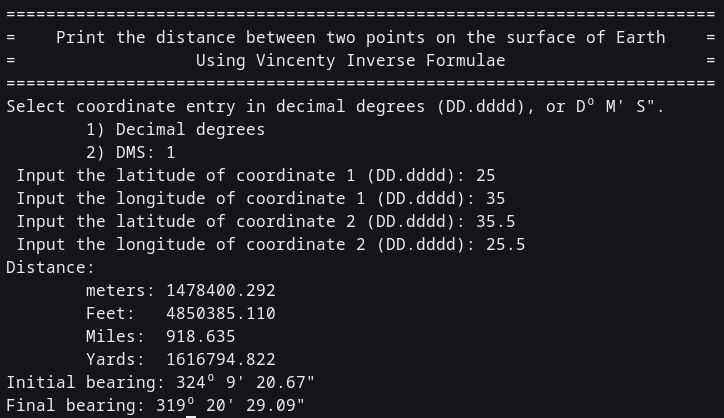
The alpha variables are the deviations from true North, and are converted to DoM’S” format. Except for defining needed variables (an exercise for the reader), that’s the program. The Vincenty direct formulae are used to determine coordinates from an initial coordinate, given distance. A good way to determine if the formulae are correct is plug the derived values into the other set of formulas. The below image uses the example from this website to determine accuracy. The deviation from that and what is presented here is 3 mm, or about 1/8 inch and may be due to rounding errors.
Earlier, I was stressing on why my original values were so far off from what they should be, before I realized I had left off three letters at the end of the loop. Those letters were ABS, which causes an absolute value to be used for the while determination. So, the loop wasn’t being executed! Bugging at its finest! But it did allow me to become much more familiar with the formulae.
That’s it for this post. May God guide your steps and life each day through His Son Jesus (Yeshua).
The website https://www.gps.gov/ is the main location for information and usage.↩︎