Rpi 4 PWM - Part 3
Well, a slow Sunday afternoon, so I thought I would look at the Python pulse width modulation (PWM) program again and see how I could increase the functionality. So, I decided to see if I could add a few more lines to permit changing the PWM frequency along with the existing duty cycle. This takes it a bit beyond the original intent to set a power supply output via a voltage regulator (VR). Still, it works fine for that application too. After lots of troubleshooting (remember, I am not a Python expert by any stretch) I managed to get it working.
To go into more detail, still using Tkinter for a nice window, I added some prompts for frequency input. So now the program shows two input boxes, one for the duty cycle and one for frequency. I found that inputting frequencies above ~500 Hz increases the output instability to unacceptable levels. Remember, this is software PWM, not hardware. RPi.GPIO does not currently address hardware PWM. Will it in the future? I don’t know.
Operation is simple. After starting the function with the “Activate” button, the cursor is in the duty cycle input box. You then have two options: enter a number, press <RETURN>; or, tab to the frequency input box. In either box, regardless of input, the <RETURN> key will execute the function. However nothing will happen until some percentage of output is entered. Still, you can enter a frequency in advance of any percentage output and it will retain that value until you enter a percent. That’s not too useful without some output, however.
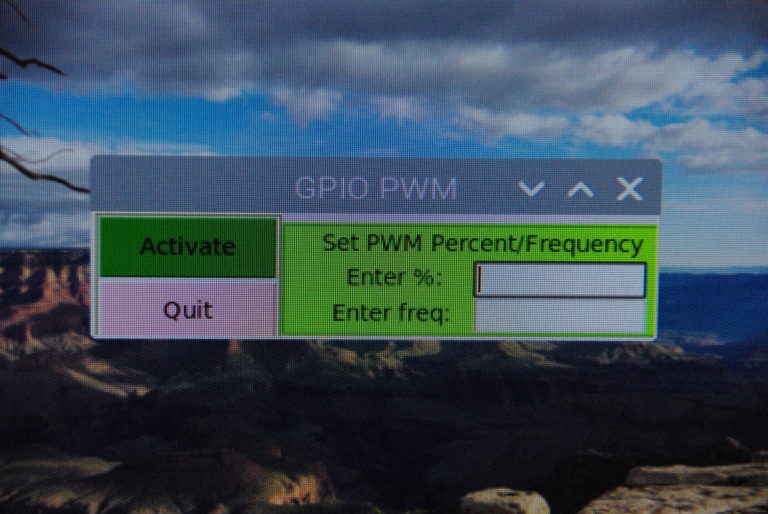
When you are finished, pressing the “Quit” button shuts off the PWM function and exits the window back to the desktop. And, that’s about it. Pretty straightforward operation.
You can view or download the file using this link:PWM Control