Code
void setup_gps(void);
string convertToString(char* a);
#define UART_ID uart0
#define LINE 255I recently acquired a couple of global positioning system (GPS) receiver modules from Sparkfun.com and decided to see if I could incorporate one into the portable weather station I had recently built. To prepare myself for the effort, I first wanted to ensure I could read it on a regular computer. I have a GPS hooked up to my main computer, but the program is Python, so I had to determine how to do the same thing in C++. Turns out that was fairly simple as the GP-1818MX GPS module puts out standard NMEA-0183 (National Marine Electronics Association) sentences using a UART set to 9600 baud. It uses the MT3337 GPS chip, and has a built-in antenna. The receiver has a sensitivity of -165 dBm,1 and can search using 66 channels and track 33 channels. It does use 55 mA @ 3.3V, which is a bit higher than some others, but still pretty low, so can be battery operated. As the existing weather station I built and intend to incorporate this GPS into is battery operated, that’s fine. Operating times are not intended to be continuous for my use, so time will tell how long the entire system will last before requiring recharging.
One thing that will have to change is the OLED display itself. In the current iteration of the portable weather station, I used a 128x32 pixel display. Obviously, to retain all the current information (temperature, humidity, barometric pressure), and then adding latitude, longitude and time to the mix will require a 128x64 display. So, in comes the larger display, the monochrome 0.96” 128x64. It will do nicely to display all the information I want, and uses a Qwiic/STEMMA QT connector. Of course, all this will require a box redesign, but that’s the subject of another post.
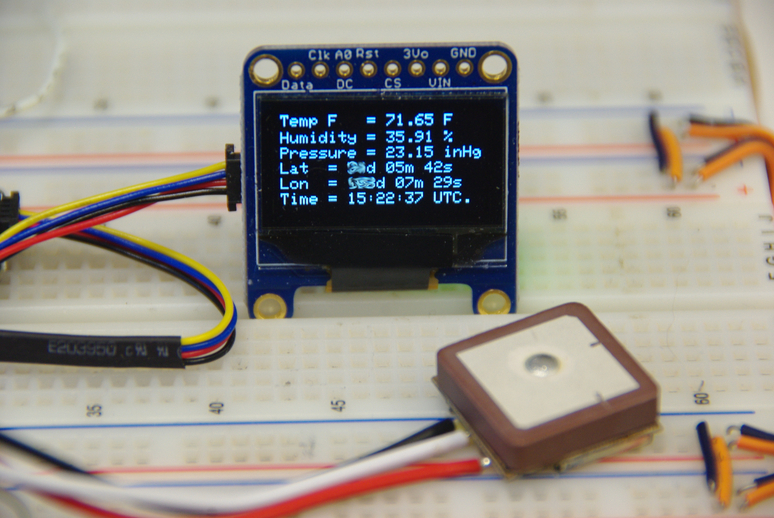
I thought, since I had space, I would add the time display you see on the bottom line. Just a nice reference to have available. One other thing I noticed about this GPS receiver module, the back of the PC board has solder connections providing a 100 mS pulse every second for timing purposes.
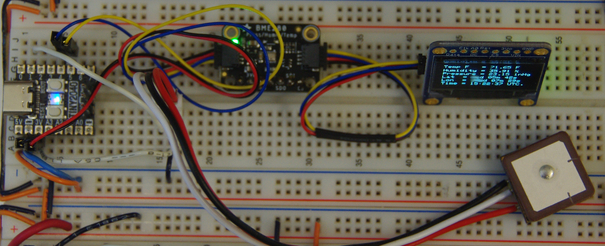
The breadboard setup is shown above. This particular setup uses the Pimoroni Tiny2040 board instead of a Pico board, but the software is the same and works on either board. Only the physical pins are different. The GPS module is in the lower right. I also noticed a tiny watch battery mounted to the PC board on the bottom side, but the documentation doesn’t mention anything about it. I presume it retains the last calculated position for faster startup.
Anyhow, I am using the standard NMEA-0183 GPGGA sentence as it contains more than I will use here. This website has a nice reference for this particular sentence and explains each element.
Most of the software from this post is used with additional code for the GPS itself. Two functions are added, one to setup the GPS UART, and one for converting characters to strings.2
void setup_gps(void);
string convertToString(char* a);
#define UART_ID uart0
#define LINE 255The last two lines above define which UART to use on the Pico/Tiny2040, and the size of the buffer for storing the received data from the GPS. The two functions are shown below. Both boards have two UARTs, but the Pimoroni Tiny2040 has limited pins; so as I am using the I2C pins which also are UART1 for the sensor data input, I use UART0 for the GPS input. This would apply to either board, and can be changed.
void setup_gps(void)
{
    // Set up GPS
    // Initialise UART 0/1
    uart_init(UART_ID, 9600);
    gpio_set_function(0, GPIO_FUNC_UART); // TX to GPS (not connected)
    gpio_set_function(1, GPIO_FUNC_UART); // RX from GPS
}
string convertToString(char* a) {
    string s = a;
    return s;
}
Now, to receive the GPS data, I use uart_getc(UART_ID) and store the result in a buffer. Inside the main() function, I set the buffer length to LINE. But as a string should always end with \0, we make the buffer one character longer using char buffer[LINE+1];. Then, to populate the bufer, I use the following loop.
for (i=0;(i < LINE ) && (( ch = uart_getc(UART_ID)) != EOF) && ( ch !='\n' );  ++i) { buffer[i] = ch; // get GPS sentences
}
buffer[i] = '\0';
The last line adds the the aforementioned line ending. Next, to parse the buffer, we want a string, so we use the following function. And now we have a string called data1 we can play with.
string data1 = convertToString(buffer);As the NMEA sentences are separated by commas, and we only want the GPGGA sentence, we first identify if the buffer starts with that sentence, then break it apart into the required fields.
if(data1.substr(0,6) == "$GPGGA") {
    hour = data1.substr(7,2);
    minute = data1.substr(9,2);
    second = data1.substr(11,2);
    lat_deg = data1.substr(18,2);
    lat_min = data1.substr(20,2);
    lat_sec = to_string(int (stof(data1.substr(22,5)) * 60));
    lon_deg = data1.substr(30,3);
    lon_min = data1.substr(33,2);
    lon_sec = to_string(int (stof(data1.substr(35,5)) * 60));
    lat = "Lat  = " + lat_deg + "d " + lat_min + "m " + lat_sec + "s";
    lon = "Lon  = " + lon_deg + "d " + lon_min + "m " + lon_sec + "s";
    time = "Time = " + hour + ":" + minute + ":" + second + " UTC.";
}
The bottom three lines don’t need to be inside the if() loop, but as I was having problems on a cold start,3 requiring reset until a good GPS signal was acquired, I tried moving them inside the loop.4 To define what the numbers in the substring statements above refer to, below is a representative sentence showing where the field positions lie. The first number is the starting position, the second the substring length.
Format to parse GPS sentence:
       time       lat         lon            #sats  alt
       |7       17|18   27|   |30    40|     |45    |52
$GPGGA,232101.338,3200.2342,N,10622.2867,W,1,09,0.9,1246.8,M,-23.1,M,,0000*5B
Finally, notice the difference from this post where I use sprintf() to form the strings for OLED display, and the three lines mentioned earlier. The printf() function (and its variants) is a C function rather than C++. The reason I am using the above is having issues showing the correctly formatted data from the GPS. I thought about including iostream5 to use its overloaded cout function, but that grew the compiled UF2 file size to over 500 kBytes. Not really desirable (or necessary) for the Pico which has only 2 kB of flash.
The last minor change was moving the displayed strings around a bit to make them all fit. There are 64 pixels vertically on the OLED, and the font is 8 pixels high, so I changed the positions as shown here.
oled.clear();
oled.drawString(0,0,  tempF);
oled.drawString(0,11, humidityChar);
oled.drawString(0,21, pressureChar);
oled.drawString(0,31, lat);
oled.drawString(0,41, lon);
oled.drawString(0,51, time);
oled.display();
And that’s it! As my knowledge of C/C++ is like a sieve (full of holes), I’m sure the structure could be much better with a “bit-o-work”, but it is what it is! Have a great day in the Lord Jesus! If you are not right with God, get right, through His Son Jesus! If you don’t believe in Jesus, what if you’re wrong? Are you willing to bet your soul?
-165 dBm is 0.0013 micro Volts.↩︎
It is easier to parse strings than a character array, especially NMEA sentences which use a comma separator character.↩︎
A cold start condition is on power up where no satellites are in GPS memory.↩︎
I am still trying workarounds during a cold start that will display the other parameters without a valid GPS signal.↩︎
The cout function needs #include <iostream> in the C++ file.↩︎