dms <- function(d1) {
    left1 =  d1*(3600);
    degs = trunc( left1 / (3600));
    left2 =  left1 - degs*(3600);
    mins = trunc(left2/60.0);
    osec = trunc(left2 - mins*60);
    return(paste(degs, '\U00b0', mins, '\U2032', osec, '\U2033', sep=""))
}Curve Deflection and Circular Curve Calculations
Land Surveying
Purpose.
What I wish to do is better define the “R” program to calculate simple curves used for road layouts and other curved structures. Also, as a part of that process, the angle deflections and chord lengths required in the actual laying-out of the curve itself on the ground need to be calculated. A tabular format is ideally suited for that procedure and could be printed to a file, etc.
Program structure and setup.
Functions.
Table results look better and are easier to interpret when laying out on a transit or theodolite if displayed as degrees, minutes, and seconds (DMS) rather than decimal degrees (dd). So a function is needed to do that for the final output table. I found this on the Internet and modified it for my purposes to return the string directly. Output results are shown in the chart at end of this document for the two angle columns.
Also, the opposite function is necessary to handle user input such as a total deflection angle or maximum curve angle, whether entered as DMS or dd.
dms2dd <- function(d1, switch) {
    deg <- as.double(word(d1, 1, sep=","))
    if (as.double(word(d1, 2, sep=",")) == 0) min =0
    else min <- as.double(word(d1, 2, sep=","))/60
    if (!switch) {
        if (as.double(word(d1, 3, sep=",")) == 0) sec = 0
        else sec <- as.double(word(d1, 3, sep=","))/60/60
    } else sec = 0
    dd <- deg + min + sec
}
Another function will identify input type for total deflection angle. DMS or DM is identified using regular expression patterns.
entryFormat <- function(string) {
    pat = "([0-9]{1,2},[0-9]{1,2},[.0-9]{1,2})"
    patShort = "([0-9]{1,2},[.0-9]{1,2})"
    st = str_detect(pattern=pat, string)
    stShort = str_detect(pattern=patShort, string)
    if (st == T) {
        out <- dms2dd(string, FALSE)
    } else {
        if (stShort == T) {
            out <- dms2dd(string, TRUE)
        } else {
            out <- as.double(string)
        }
    }
}
Another trigonometric function not used very often is the \(exsecant(x)\) function. It is not found on most calculators, and has fallen out of general use, except for some surveying applications. I present it here as a reminder to me! The \(exsecant(x)\) function can be duplicated by using the \(\sec(x)-1\) function, which can be accomplished using the reciprocal of \(\cos(x)\) or the \(sec A = \frac{c}{b}\) function. It sounds complicated, but it boils down to this:
\[exsec(x) = (\frac{1}{\cos x}) - 1\]
One use is determining the radius (R) of a curve using the deflection angle (I) and the external distance (E) as so: \(R = E / ((\frac{1}{\cos (I/2)}) - 1)\). The R program trigonometric functions require the angle to be in radians, so two versions allow degree or radian inputs.
# Uses degree input
exsecD <- function(x) { (1/cos (x/(180/pi)))-1 }
# Uses radian input
exsecR <- function(x) { (1/cos (x))-1 }
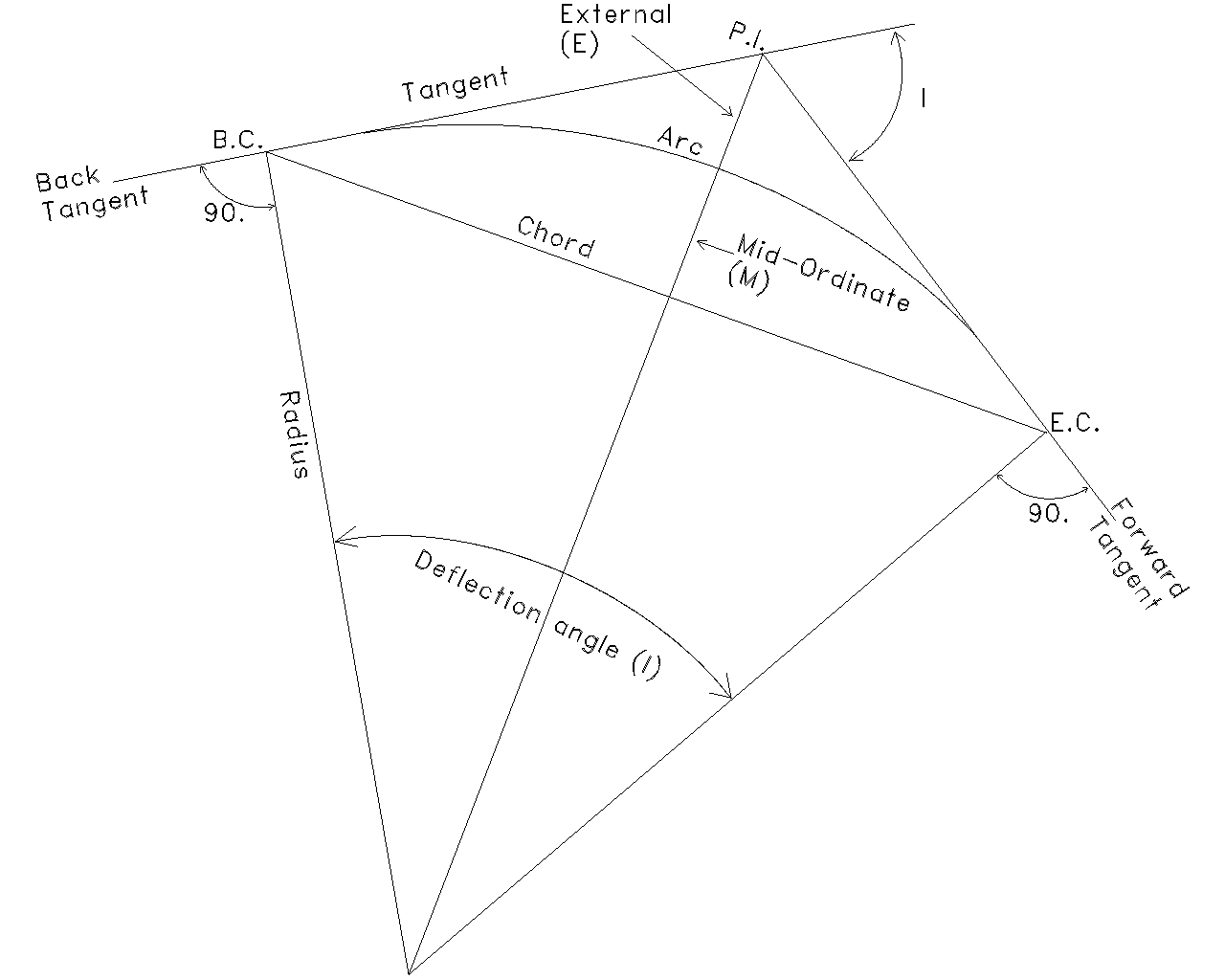
In the diagram, B.C is beginnng of curve, E.C. is ending of curve, P.I. is point of intersection.
User inputs.
Several inputs are required to allow the program to function. Also, some decisions need to be made as to the type of values to use for following calculations.
One required input is whether to calculate the radius based on desired degree of curve using either the chord or arc definitions. The arc definition calculates 100 ft. following the arc, whereas the chord is based on a 100 ft. straight line which subtends the arc. The other option is enter the radius directly, if known.
Inputs are:
- Maximum degree of curve (D, usually referenced to 100 ft. of arc); or,
- Radius (if entered directly).
- Deflection angle (for entire curve).
Calculations.
Once the user selects the desired method, calculations can begin. Desired curve parameters to be calculated are below. “R” requires radians for trigonometric operations so we convert angles to radians as follows: \(\frac{\Delta}{180/\pi}\), then for the formulas:
- Radius, if not directly entered. For Arc: \(R = \frac{5729.58}{2}\;\) For Chord: \(R = \frac{50}{\sin(D)/2}\)
- Tangent (distance from B.C. to P.I.). \(T = R \tan(\frac{\Delta}{2})\)
- Chord (from B.C. to E.C.). \(C = 2 R \sin(\frac{\Delta}{2})\)
- Arc length (from B.C. to E.C.). \(L = 2 \pi R \frac{\Delta}{360}\)
- External (from P.I. to top of arc). \(E = R ((\frac{1}{\cos (\Delta/2)}) - 1)\).
- Mid-ordinate (from chord to arc). \(M = R \cos(\frac{\Delta}{2})\)
After the required inputs, results are calculated and displayed.
[1] "Circular curve calculations. Direct radius entry."[1] "Deflection Angle: 12.85"[1] "Maximum Deg. of Curve: 14.3615"[1] "Radius: 400"[1] "Tangent: 45.0439"[1] "Chord: 89.522"[1] "Arc Length: 89.7099"[1] "External: 2.5282"Another choice available is whether deflection angles are needed to perform actual laying-out of the curve. This asks for starting B.C. and station intervals to calculate each arc length from B.C. but also provides individual chords and angles if moving up on the curve is required, such as an obstruction prevents viewing of any station. The following chart depicts a typical example and the outputs generated.
Table: Curve Deflection Values

| Station| Arc_Length| Deflection_Angle| Chord_Length| Individual_Angle| Individual_Chord|
|-------:|----------:|----------------:|------------:|----------------:|----------------:|
|  200.00|      3.262|          0°14′1″|        3.262|          0°14′1″|           3.2620|
|  220.00|     23.262|         1°39′57″|       23.259|         1°25′56″|          19.9979|
|  240.00|     43.262|          3°5′54″|       43.241|         1°25′56″|          19.9979|
|  260.00|     63.262|         4°31′50″|       63.196|         1°25′56″|          19.9979|
|  280.00|     83.262|         5°57′47″|       83.112|         1°25′56″|          19.9979|
|  286.45|     89.710|         6°25′30″|       89.522|         0°27′42″|           6.4478|
If the output is not printed, the program ends. The complete R file can be found here.
A PDF of this posting can be found here